
Planning a family trip used to mean drowning in browser tabs, conflicting TripAdvisor reviews, and that one forum post from 2014 that may or may not still be relevant. However, we discovered a family travel hack that simplifies the entire process.
There’s this constant scramble. You want to know which attractions work for kids, what restaurants won’t make you cringe at the bill, and if that ‘must-see’ museum will bore your 7-year-old in 11 minutes.
Lonely Planet Guides have been around forever. You probably remember those chunky yellow books your parents had stashed somewhere. But the whole system has changed. The digital versions and app subscription model now make these guides much more useful for families planning trips without losing their minds, making them our go-to family travel hack.
The basic idea is simple. You get access to thousands of city guides, attraction reviews, and itineraries that someone actually researched. It’s not just scraped from other websites.
For families specifically, this means less time googling “is [destination] good for kids?” at 11pm and more time actually… You know, planning the fun parts.
Features Overview
What You Actually Get
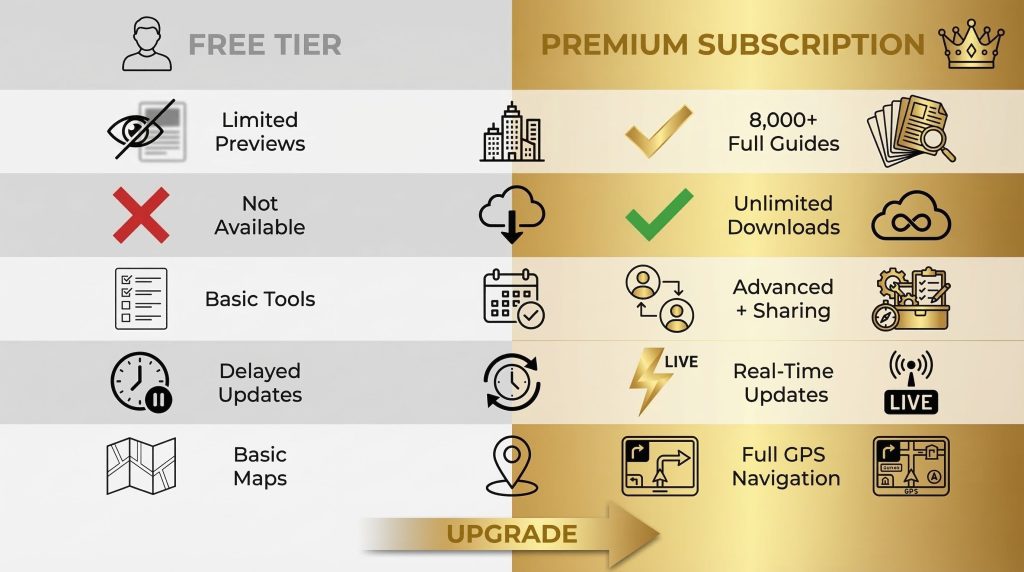
The Lonely Planet subscription gives you access to over 8,000 city guides and more than 350,000 attractions worldwide. That’s an incredible amount of content.
Here’s what the package includes:
The guides are broken down by destination. Each covers the usual—where to eat, sleep, and what to see. But they also include practical details that actually matter when you’ve got kids in tow.
You’ll find notes on which neighborhoods are walkable and where the bathrooms are (crucial). You’ll also learn the best times to visit places to avoid crowds.
The app version syncs across devices, so you can plan on your laptop and then pull everything up on your phone when you’re actually standing on a street corner trying to figure out where you are.
Offline access is included with the paid tiers. This is huge for international travel, where data roaming costs make you want to weep.
Download guides before you leave to access everything without wifi.
The itinerary builder lets you save attractions, restaurants, and activities into custom trip plans. You can organize by day, add notes, and share the whole thing with your travel companions (aka your spouse, who needs to know the plan but definitely isn’t helping research it).
There’s also a feature that lets you filter recommendations by category. Looking for outdoor activities?
Kid-friendly museums?
Restaurants with high chairs? The filters quickly narrow your options.
The Family Travel Hack Angle
Here’s where this becomes relevant as a family travel hack specifically…
Most travel guides are written for solo travelers or couples who can just spontaneously decide to check out that cool underground bar at midnight. Lonely Planet guides include sections on family-friendly options, and the app’s filtering system lets you quickly identify activities that work when you’re traveling with kids.
The ‘Plan’ section in each guide often suggests itineraries by interest and duration. You’ll usually find family-specific itineraries that account for short attention spans, nap times, and the need for playgrounds between museum visits.
Check out Lonely Planet’s current subscription options here to see the full feature breakdown and pricing.
Performance Analysis
How It Actually Works in Practice
The guides are comprehensive. Sometimes they’re almost too comprehensive. A major city guide might have over 200 restaurant recommendations.
That’s great for options, but it can feel overwhelming when you just need to pick ONE place for lunch before everyone has a meltdown.
The search and filter functions help narrow things down. The interface takes a minute to get used to. It’s not as intuitive as Google Maps. But once you figure it out, it works smoothly.
Loading times are generally solid. The app doesn’t lag much, and offline content loads quickly once it’s downloaded. The download sizes can be chunky, though… a full city guide with maps might be 200-300MB, so make sure you’ve got storage space on your phone.
Content Quality and Accuracy
The writing quality is consistently good. Reviews and descriptions are detailed but never boring. They include practical details like price ranges, opening hours, and how long to budget for each activity.
That said… accuracy can vary. Some guides get updated more frequently than others.
Popular destinations like London, Paris, or Tokyo get constant updates.
Smaller cities may have information that’s a year or two old. Some restaurants or attractions listed might have closed or changed.
The user rating system helps supplement the editorial content. You can see what other travelers thought of specific places, which gives you a more current picture.
Mobile App vs. Website
The mobile app is designed for use during your trip, while the website is more suited for planning at home. The app is available for both iOS (4.8/5 rating) and Android (4.4/5 rating).
The app works well for on-the-go reference. You can quickly pull up saved itineraries, check maps, and find nearby recommendations.
The GPS integration lets you see what’s around you in real time.
The website’s larger screen makes it better for the heavy-duty planning stage at home, letting you compare destinations and build detailed itineraries. Once your trip begins, most features are available in the app for on-the-go reference.
Because both the app and website sync automatically, you can plan on the website and seamlessly access your saved trips in the app while traveling.
Pros and Cons
What Works Really Well
The breadth of coverage is unmatched. If you’re planning or considering trips to many destinations, having guides for nearly everywhere in one subscription is genuinely useful. There’s no need to buy individual guidebooks for $20-30 each.
Offline functionality is reliable. Download everything before your trip, and you’re set. No scrambling for wifi in a foreign city just to figure out where you’re going.
Editorial quality is consistent. These are professionally researched and written guides, not just user-generated content of wildly varying quality. You get reliable information and a consistent format across all destinations.
Family-focused filtering saves tons of time. You can quickly find kid-friendly options. That means less wasted time researching places that won’t work for your family anyway.
Regular updates for major destinations. Popular cities receive frequent content refreshes to keep information current.
What Could Be Better
The interface has a learning curve. It’s not bad, but it’s not immediately obvious where everything is. First-time users will spend some time clicking around, figuring out the navigation.
Information density can be overwhelming. Having 200 restaurant options sounds great, but decision fatigue is real. Sometimes you just want someone to tell you the top 5 places to eat in a neighborhood.
Smaller destinations get less love. If you’re traveling off the beaten path, the guide might be basic. Options may be limited, and information may be older.
The free tier is pretty limited. You can poke around a bit, but you’ll hit paywalls quickly. It’s basically a teaser to get you to subscribe.
No real integration with booking platforms. You can’t book hotels or activities directly through the app. It’s just information and planning… You still need to go elsewhere to actually make reservations.
Some content overlaps with free choices. A lot of this information is available for free through blogs, Google Maps reviews, and travel forums. You’re paying for the convenience of having it curated and organized in one place.
User Experience
The Planning Process
The typical workflow starts on the website or app. Search for your destination. Each city guide opens with an overview describing the place, best times to visit, and general travel tips.
From there, you can browse by category (sights, eating, sleeping, entertainment, shopping) or use the search function to find specific things.
The itinerary builder is where the magic happens for trip planning. You can create many trips and add destinations to each day. Reorganize things by dragging and dropping, and add your own notes.
For families, you can map out realistic daily schedules that include travel time, meal breaks, and rest periods. The map view shows where everything is geographically, so you can group activities by neighborhood instead of zigzagging across the city.
During the Trip
Once you’re actually traveling, the app becomes your reference tool. The saved itinerary keeps everything organized… no need to remember which spreadsheet you saved that restaurant name in.
The GPS integration shows nearby attractions and restaurants based on your current location. This is helpful when plans change (they always change with kids) and you need to find something quickly.
Offline access means you’re not completely dependent on internet access wherever you go. It is especially valuable when traveling internationally, where data can be expensive or unreliable.
Real User Feedback Trends
Looking at actual user reviews across app stores and travel forums, a few themes keep coming up…
People consistently praise the offline functionality and comprehensive coverage. Travelers appreciate having reliable information accessible even without an internet connection. The itinerary builder gets mixed feedback. Some people love it; others find it clunky compared to dedicated trip-planning apps like TripIt or even Google Maps with saved lists.
Complaints often focus on subscription costs relative to free options, occasional outdated information, and the lack of more advanced features such as collaborative trip planning or integration with booking systems.
Families specifically mention appreciating the kid-friendly filters and practical information on stroller accessibility and bathroom locations. These details matter way more when you’re traveling with children.
Value for Money
Pricing Breakdown
Lonely Planet offers a free tier with limited access and a premium subscription that typically runs around $40-60 per year, depending on promotions. There’s also a monthly option at a higher per-month rate if you don’t want to commit to a full year.
Individual printed guidebooks cost $20-30 each. So if you’re planning trips to 2-3 destinations in a year, the subscription quickly becomes more economical than buying separate books.
Comparing Alternatives
Free options like Google Maps, TripAdvisor, and travel blogs obviously cost nothing. They provide similar information, but it’s scattered across many platforms and takes more time to compile and organize.
The trade-off with Lonely Planet is paying for convenience and curation.
Other paid travel apps, like Rick Steves Audio Europe (free for audio content; guides sold separately) or TripIt Pro ($49/year for trip organization only, no destination content), serve different purposes. Rick Steves focuses heavily on Europe and adheres to a specific travel philosophy.
TripIt organizes your bookings but doesn’t provide destination research.
Traditional guidebooks offer the same editorial content but lack searchability, updates, and offline digital convenience. They’re also heavier to pack if you’re traveling to many destinations.
Who Gets the Most Value
The subscription makes the most sense if you plan to take many trips per year to different destinations. The cost-per-trip drops significantly when you use it for 3-4 vacations per year.
Families particularly benefit from the kid-friendly filtering and practical information that’s harder to find in standard travel resources. The time saved in research can legitimately justify the subscription cost when you factor in how valuable your time is.
If you typically travel to the same places repeatedly, the value drops. Once you know a destination well, you probably don’t need a guide anymore.
Single-destination travelers might be better off with a free choice or a one-time guidebook purchase, unless they specifically want the app interface and offline access.
You can try Lonely Planet’s free tier before committing to a subscription to see if the interface and content work for your planning style.
Final Verdict
Lonely Planet Guides work well as a centralized planning tool for families who take many trips per year and want reliable, curated information without spending hours cobbling together research from random blogs and forums.
The subscription model makes sense financially compared to buying individual guidebooks, and the digital format offers practical advantages like offline access, searchability, and trip organization that printed books can’t match.
The content quality is consistently good with detailed, professionally researched information for thousands of destinations. The family-friendly filtering and practical details about accessibility, facilities, and kid-appropriate activities make this particularly useful for family travel planning.
That said, the interface takes some getting used to, smaller destinations have less comprehensive coverage, and much of this information exists elsewhere for free if you’re willing to spend the time hunting it down.
Bottom Line Recommendations
The subscription is worth considering if you:
- Plan 2+ trips per year to different destinations
- Value having curated, reliable information in one place
- Travel internationally, where offline access is important.
- Have kids and need family-specific filtering and recommendations.
- Want organized itinerary-building tools integrated with destination content
You might want to skip it if you:
- Take one annual vacation to familiar destinations.
- Prefer crowd-sourced reviews over editorial content.
- Don’t mind spending extra time researching across many free platforms.
- Need advanced features like booking integration or collaborative planning.
- Travel primarily to off-the-beaten-path locations with limited guide coverage.
The free tier gives you enough access to assess whether the format and content work for you before paying anything. Start with the free version and upgrade if you find yourself hitting the paywalls frequently during your trip planning.
For families looking for a practical family travel hack that consolidates research and planning into one manageable tool, Lonely Planet’s subscription model delivers solid value. It won’t solve every travel-planning challenge, but it removes much of the friction from the research phase… which means more time enjoying the actual trip and less time stressing about logistics.
The guides have evolved from those chunky yellow books into a legitimately useful digital planning resource. Not perfect, but pretty good for what they’re designed to do.
Check current subscription pricing and features here to see if it fits your travel planning needs and budget.
Affiliate Disclosure for Smart Miles Traveler
At Smart Miles Traveler (https://smartmilestraveler.com), our goal is to provide helpful, honest, and practical travel tips, product recommendations, and money-saving strategies.
Some of the links on this website are affiliate links. This means that if you click on a link and make a purchase, we may earn a small commission at no extra cost to you.
These commissions help support the operation of this website and allow us to continue creating free, high-quality travel content for our readers.
Questions or Concerns
If you have any questions about our affiliate relationships or how this website operates, please feel free to contact us.
📧 Email: info@smartmilestraveler.com